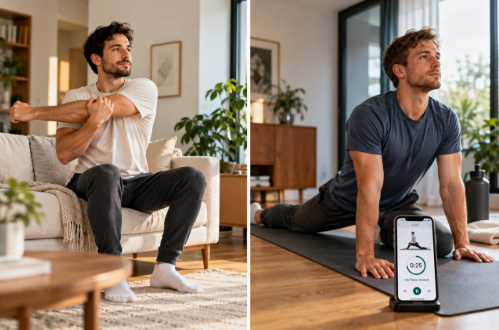
Most stretching apps are easy to admire in a store listing. The harder question is whether they are easy to use at 7:40 on a weekday morning when you feel stiff, have ten minutes, and do not want to learn a new fitness vocabulary before breakfast.
That is the lens we used for Flexor. We did not begin by exploring every tab. We began with ordinary requests: something short in the morning, something for neck and shoulders after screen time, and something simple enough that a beginner would not spend half the session wondering whether they had chosen the wrong routine.
What stood out was not one spectacular feature. It was the absence of friction. Flexor is organised around body area, goal, difficulty, context and available time, which means the first useful decision is usually a familiar one: where do you feel you need movement, and how long do you have?
A few numbers behind the first impression
A hands-on review is more useful when the product footprint is measurable. As of 8 October 2026, Flexor’s public catalogue documents 100 ready-made routines spanning body areas, goals, sports, difficulty levels and routine types. The same public FAQ says the app is fully localised into 14 languages, including spoken guidance and exercise demonstrations in those languages on iPhone and Android.
The UK App Store listing currently shows a 180.5 MB app, support for iPhone, iPad and Apple Watch, and “English + 13 more” languages. It also shows a 5.0 rating from four ratings. That score is positive, but four ratings is far too small a sample to treat as decisive social proof, so we would not use the rating alone as evidence of quality.
Google Play has now moved Flexor into the 1K+ downloads band, a more useful signal of early traction than the older 100+ figure. Public Android review activity is also now visible, including multiple positive user comments. We would still describe the review base as emerging rather than mature, but it is no longer a product with almost no public feedback. Google Play also states, based on the developer’s data-safety declaration, that no data is shared with third parties and no data is collected.
We also checked the public website footprint. An independent automated availability check on 28 September 2026 recorded a 259 ms response time for flexor.app. That is a server-response measurement rather than a full Core Web Vitals test, so we have not presented it as LCP or FCP. The useful point is narrower: the public site responded quickly in that check.
The first five minutes matter more than the feature list
A beginner morning query for roughly ten minutes of full-body mobility surfaced Rise and Shine at 8 minutes 50 seconds, with ten movements covering shoulders, chest, upper back, hips and knees. More importantly, the nearby alternatives were contextually different: warm-up, pre-workout mobility, recovery and flexibility rather than five near-identical ‘full-body’ sessions.
That separation is a small editorial detail with a large practical effect. A giant library is not helpful if every option looks interchangeable. Flexor’s guided routine experience is strongest when it narrows the decision before the routine starts, then removes decisions once you are moving.
The player itself is straightforward: ordered steps, timing, visual demonstrations and audio cues. It behaves like a session rather than a folder of individual stretches. For somebody new to mobility work, that distinction matters because the app is doing the sequencing and counting rather than asking the user to improvise.

A desk-work test showed the catalogue is more specific than it first appears
We then switched context completely and asked for a short neck-and-shoulder session after desk work. The catalogue returned several close matches around the ten-minute mark, split across recovery, mobility and posture rather than presenting one generic ‘upper-body stretch’ result. That was a better beginner experience than the raw number of routines suggests, because the labels explain why each session exists.
For desk workers, that makes the dedicated desk-work approach more useful than a generic search box. The app can be specific without pretending it knows why your neck feels uncomfortable. That boundary is important: Flexor does not diagnose pain, assess an injury or use the camera to judge form.
AI is helpful when the request is easier to describe than filter
The AI routine builder makes most sense when you know the situation but not the routine. A request such as ‘I have ten minutes, want something gentle for hips and lower back, and do not have equipment’ is easier to say than to translate into filters. Flexor uses those inputs to create or recommend a routine from its structured exercise library, which you can review before starting.
That is a better use of AI than pretending an algorithm can see what is happening inside your body. The assistant is essentially a routing layer over known Flexor exercises and routines. It helps with selection; it does not claim to perform assessment.
What becomes useful only after the first few sessions
Flexor is feature-rich, but beginners do not need most of that richness on day one. After a few sessions, the surrounding tools start to make more sense. The daily recommendation reduces repeat decision-making, reminders solve the very ordinary problem of forgetting, and saved or custom routines become useful once you know which movements you prefer.
Progress is also handled sensibly. The app records completed sessions, streaks and consistency instead of presenting a mysterious ‘mobility score’. That is more credible: a beginner can see whether the habit is taking hold and which areas have received attention without being told that app usage is equivalent to a clinical measure of flexibility.
The free version is unusually representative of the real product
One of the easier ways for a wellness app to lose trust is to let users configure everything and then discover that the useful part sits behind a subscription. Flexor takes a different approach. The no-cost tier provides the guided library and longer-form programmes, lets users save or build sessions, supports reminders and on-device playback, and includes basic activity tracking plus a small monthly AI allowance. Premium is reserved mainly for higher AI usage, richer statistics and the dedicated Pain Relief collections.
That makes the free version a meaningful test of the product rather than a demo. A user can find out whether Flexor actually fits their week before deciding whether any premium layer is worth paying for.
What the interface gets right after the first week
The first-session experience is only half the test. A beginner app also has to remain understandable once favourites, recommendations and previous sessions begin to accumulate. Flexor handles that reasonably well because the home experience still prioritises the next useful action rather than turning into a dense analytics dashboard.
The practical hierarchy becomes clearer with use: browse when you know the area, accept a recommendation when you do not want to decide, use AI when the request is easier to describe, and save or customise only when you have learned what you like. Those paths overlap, but they do not require the user to understand the whole product at once.
This is also where the absence of aggressive gamification helps. Streaks exist, but the app does not frame mobility as a competition. The useful signal is simpler: whether sessions are becoming regular and which parts of the body have received attention recently.
The strongest beginner feature may be the one that says the least
Offline access is not visually impressive, yet it changes the feel of a wellness app. A user can keep following the core catalogue, plans and player when travelling or when Wi-Fi is unreliable. For someone trying to build consistency, that reliability is arguably more important than another decorative dashboard.
The limitation is straightforward: AI requests still need connectivity. That division makes sense technically, but it is worth understanding before relying on generated sessions during travel.
A few things a real beginner should know
- Flexor can initially look more complicated than it feels because the app has more features than a beginner needs. Starting with one body area or the daily recommendation is simpler than touring every feature.
- There is no camera-based technique correction. The app demonstrates and guides, but it does not watch your movement or replace a coach or physiotherapist.
- AI requests require an internet connection even though the core routine experience can work offline once content is on the device.
Who we think it suits best
Flexor is particularly easy to recommend to people who are new to stretching, desk workers who repeatedly need short targeted sessions, gym users looking for warm-ups or recovery work, and anyone who wants a routine without first designing one.
Its strongest quality is not novelty. It is judgement. The app repeatedly makes the next step obvious without pretending to know more about the user’s body than it actually does. For a beginner, that is exactly the right balance.
